Choosing DDR5 memory can feel surprisingly complicated. The right capacity depends on your software, gaming habits, and upgrade plans. A modern gaming PC may run smoothly with 32GB, while content creation often benefits from 64GB or more. Browser tabs matter too. Dozens of tabs, streaming tools, and background applications can quietly consume available memory.
So, how much DDR5 RAM do I need for my system? The answer requires more than comparing gigabyte numbers. We will examine gaming, office work, video editing, 3D production, and demanding multitasking. Real usage patterns matter more than impressive specifications. A game may use 12GB, but Windows, voice chat, launchers, and recording software need additional space. When memory runs short, stuttering can appear during busy scenes.
This guide uses practical hardware guidance and current upgrade considerations. It also explains dual-channel kits, memory speeds, motherboard limits, and the difference between capacity and performance. More RAM is not automatically better. Buying 128GB for light office work may waste money, while choosing 16GB for heavy editing can create frustration. There is no perfect number. Even experienced builders can misjudge future needs. I may favor extra headroom, but budget and platform compatibility still matter. Check your motherboard manual and workload before purchasing. Small details count. By the end, you should understand how much DDR5 RAM do I need and why that answer may change over time.
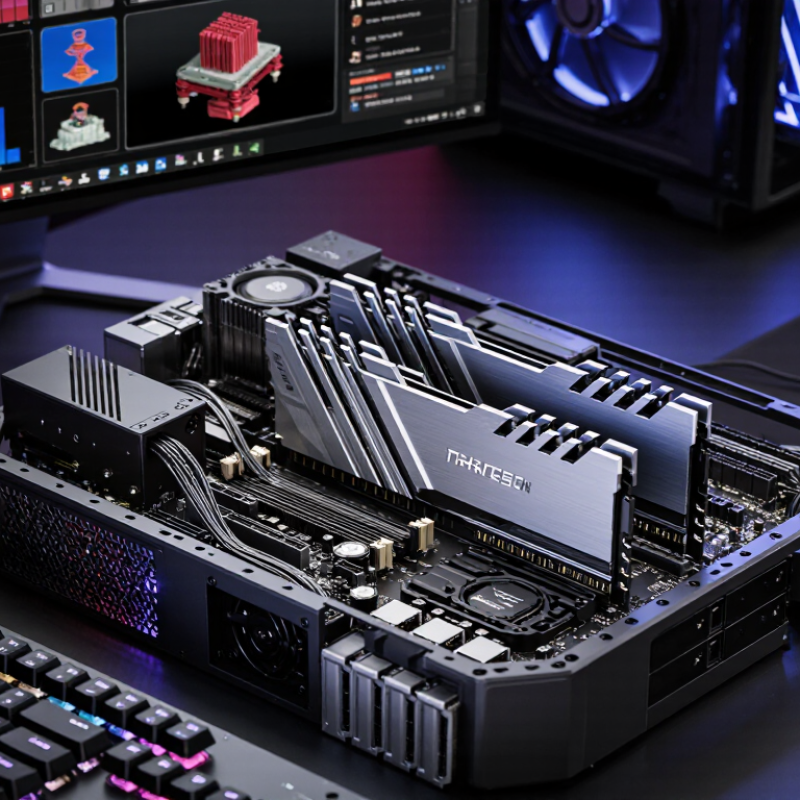
The operating-system vendor’s published Windows 11 requirements list 4GB of memory. That figure is an installation floor, not a comfortable target for everyday work.
Define the workload before choosing a kit. For email, documents, and light browsing, 16GB is a sensible starting point. A September 2024 PC gaming hardware survey showed 16GB as its largest single system-memory category, reflecting how common that capacity remains.
For gaming alongside chat, streaming, or creative applications, 32GB gives more breathing room. Video editing, large design files, and virtual machines can justify 64GB, especially when projects stay open together.
Use the task, not a dramatic benchmark, as your test. Watch memory use during a normal busy session: a browser full of research tabs, a call, and your editing software. If usage repeatedly nears capacity and the computer stutters, more RAM may help. I would still check whether the workload is the real cause; one unusually heavy session can mislead. Leave room for growth, but do not buy capacity you will never use.
For everyday browsing, office work, and light photo editing, 16 GB of DDR5 is a sensible starting point. A leading desktop photo editor’s published system requirements list 16 GB as recommended memory, rather than a guarantee of smooth performance in every workflow. That distinction matters. A large image, several open browser tabs, and an editing app can quickly compete for memory. When RAM runs short, your computer may rely on slower storage, making image adjustments feel less responsive.
Tips: Check the software’s current requirements before buying. Keep an eye on memory use while editing a typical project, not just an empty test file. If you work with layered images or several large files at once, 32 GB can offer useful headroom. Independent workstation testing often evaluates performance with real creative workloads, but results depend on file size, software version, and background tasks. I would not treat one benchmark as a universal rule.
Choose a matched memory kit supported by your computer, and leave room for future upgrades if possible. For a basic setup, 16 GB may be enough. It can still feel tight on a busy day. That is the part worth reflecting on: buying more RAM helps only when your workload actually needs it.
| Tip | Typical Use | Suggested DDR5 Capacity | Why It Fits | Practical Guidance |
|---|---|---|---|---|
| 1. Start with everyday tasks | Web browsing, email, office documents, video calls, and streaming | 16 GB | A practical baseline for general use and ordinary multitasking. | Choose a balanced 16 GB configuration if you do not regularly run several memory-intensive apps at once. |
| 2. Leave room for heavier multitasking | Many browser tabs, large spreadsheets, and multiple apps open together | 32 GB | More capacity can reduce slowdowns when several demanding workloads compete for memory. | Consider 32 GB if your workload often pushes memory use close to the installed capacity. |
| 3. Match gaming memory to the whole system | Modern games alongside voice chat, browsers, or background apps | 16–32 GB | Requirements vary by game and background workload; extra RAM does not automatically increase frame rates. | Check the requirements for the games you play and leave capacity for the operating system and other apps. |
| 4. Allow more headroom for creative work | Large photo projects, video editing, 3D work, or complex audio sessions | 32–64 GB or more | Large files, higher-resolution media, and complex projects can use substantially more memory. | Use project size and observed memory use to choose capacity; the most demanding workloads may benefit from more than 64 GB. |
| 5. Check compatibility before upgrading | Any DDR5 desktop or laptop upgrade | Based on device support | Supported memory type, maximum capacity, module form factor, and configuration depend on the system. | Check the computer or motherboard specifications. When practical, use a compatible matched kit and follow the system’s supported configuration. |
Note: These are general capacity guidelines, not guarantees. Actual memory use depends on the operating system, applications, project sizes, and multitasking habits.
How Much DDR5 RAM Do I Need 5 Expert Tips?
For gaming, multitasking, and 4K video editing, 32GB of DDR5 is a practical upgrade. Published PC game requirements commonly recommend 16GB, while professional 4K editing system requirements often specify 32GB or more. That gap matters when a game, browser tabs, chat, and editing software run together. With 32GB, switching tasks is less likely to cause stutters or slow previews. It is useful headroom, not a guarantee of higher frame rates.
Tip: Check your workload first. Open a large 4K project and watch memory use during playback and export. If memory usage stays near capacity, 32GB may help; if it does not, more RAM may change little. Two matched memory modules can also support dual-channel operation, but confirm compatibility with your system.
For editing, 4K footage, layered effects, and large timelines can push memory demand up quickly. For gaming, 32GB is most valuable when other apps stay open or newer titles exceed a 16GB setup’s comfort zone. The exact result depends on the project, game, and background tasks. More RAM is not always better. I would not buy 64GB just because a specification sheet sounds reassuring; measure your actual usage first.
For professional 4K work, 64GB is a practical target, not a luxury. An independent workstation integrator’s 2024 editing-hardware guidance places 64GB in its recommended range for demanding 4K projects. That leaves room for large timelines, layered effects, and a browser full of reference footage. The need becomes clearer when editing software, audio tools, and a virtual machine run together. Memory use adds up quickly.
Virtual machines need their own allocation. A 16GB virtual machine, for example, leaves less memory for the host system and editing apps. With 64GB installed, that setup has more breathing room than a 32GB system, though heavy projects can still cause slowdowns. Keep an eye on actual usage during a typical work session; task-manager readings are useful, but they are not a perfect measure. A 2024 workstation configuration guide recommends 64GB for demanding 4K editing, while software requirements commonly place 32GB near the recommended entry point. Those figures are starting points, not promises. Some workloads are lighter than expected. Others surprise you. Check whether your motherboard supports the capacity and speed you plan to install, and leave room for future projects.
Suggested installed memory by workload (GB)
These are practical starting points, not fixed requirements. Consider 64 GB or more for professional 4K workflows and virtual machines; project size and the number of tasks running at once can increase memory needs.
DDR5 capacity depends on more than the number printed on a kit. Two matched modules, installed in the motherboard’s recommended slots, generally enable dual-channel operation. This can provide more memory bandwidth than using one module. Check both the motherboard manual and processor specifications; either can affect supported capacity and memory speed. Small detail, big difference.
A four-slot board may offer more room to expand than a compact two-slot model, but slot count alone does not guarantee an easy upgrade. A 2 x 16 GB kit gives many users 32 GB while leaving two slots free on a four-slot board. Adding another kit later may work, yet mixed modules can run at a lower shared speed or need manual adjustments. Limits vary. Check the board’s compatibility notes before buying, and follow its firmware update instructions carefully.
Match capacity to actual use. Browsing and office tasks often need less memory, while large photo projects, virtual machines, and demanding games can benefit from 32 GB or more. Keep future needs in mind, but avoid paying for capacity your system cannot support. I once underestimated how quickly a project could grow; still, buying far more RAM “just in case” is not always sensible.
It often suits browsing, office work, and light photo editing. A few large images and many open tabs can still make it feel tight.
32GB can provide more room for layered images and several large files. Check memory use while editing a typical project.
No. It can help when games run alongside chat, browser tabs, or other apps, but it does not guarantee higher frame rates.
32GB or more is commonly recommended for professional 4K work. Large timelines and layered effects can raise memory use quickly.
Open your usual project and monitor memory during playback or export. If usage stays near capacity, more RAM may help.
Not always. Extra capacity helps only when your tasks use it, and I have misjudged project growth before.
Two matched modules in the recommended slots generally enable dual-channel operation. Check your motherboard manual for the correct slots.
Possibly, but mixed kits may run at a lower shared speed or need adjustments. Check compatibility notes and supported capacity first.
How much DDR5 RAM do I need depends on what you do with your computer, not simply on the operating system’s minimum requirements. For everyday browsing, office tasks, and light photo editing, 16GB is a practical starting point. If you play demanding games, keep many applications open, or edit 4K video, 32GB can provide more room for smooth multitasking. Your actual needs will vary with the size and complexity of your projects.
For professional 4K workflows, large creative projects, or running virtual machines, 64GB may be worth considering. Before buying, check your motherboard’s supported memory capacity and speeds, and compare complete memory kits rather than assuming separate modules will work identically. Also consider whether you may want to upgrade later: leaving available slots can help, while matching modules and using a suitable dual-channel configuration can support balanced performance. Choose capacity based on your current workload and realistic plans for the future.

Cynovex